• Tech
    Tech

    How to fix slow boot time on Windows PC

    Guide to Fix Scarlet Nexus Ghosting and Blur Graphics

    cover photo for windows 11

    How to Fix Windows 11 Health Check Failed and Download Windows 11 Preview

    AMD FidelityFX Super Resolution (FSR)

    AMD Unveils Its NVIDIA DLSS Competitor… But It’s For Everyone!

    How to Work Remotely

    How to Work Remotely | Best Remote Work Tips

    • Apple
      • iOS
      • iPhone
      • iPad
      • iOS Jailbreak
    • Google
      • Android
      • Google Smartwatch
      • Google Glass
      • Google Hangouts
      • Google I/O 2014
      • Google Maps
    • Microsoft
      • Microsoft office
      • Microsoft Windows
      • Microsoft Surface
      • Microsoft SmartWatch
      • Windows Phone
    • Smartphones
    • Tablets
  • Apps
    Apps
    WhatsApp dark mode

    How to Transfer WhatsApp Data Between Android and iOS

    Traverous Tell inspiring travel stories

    Traverous – Record, Share and Relive your Journeys

    Movavi Video Editor

    Movavi Video Editor is a User-Friendly and Intuitive Video Editing Software

    WhatsApp Beta 2.18.194 APK

    Hide Whatsapp Media From Phone Gallery in WhatsApp Beta 2.18.194 APK

    GBWhatsApp 6.75 APK

    Download GBWhatsapp 6.40 APK For Android Devices

    • iOS Apps
    • Jailbreak Tweaks
    • Windows Metro Apps
    • Windows Phone Apps
  • Gaming
    Gaming

    How to fix The Good Life stuttering issues

    The Good Life Save File Location On Windows 10

    The Good Life for Nintendo Switch

    How To Fix The Good Life Audio issues on Windows 10 (Steam)

    How to fix Far Cry 6 stuttering issues

    Far Cry 6 Save File Location on Windows 10

    • Android Games
    • Blackberry Games
    • iOS Games
    • Nintendo Games
    • PC Games
    • PlayStation Games
    • Wii U Games
    • Windows Games
    • Windows Phone Games
    • Xbox Games
  • Tutorials
  • Reviews
    Reviews
    8.5

    Immortals Fenyx Rising Review – A Great Greek Victory

    Assassin's Creed Valhalla

    Assassin’s Creed Valhalla Review — Exquisite

    8
    The Dark Pictures Anthology: Little Hope Review

    The Dark Pictures Anthology: Little Hope Review – A lot of hope here

    Watch Dogs: Legion Review — Aesthetically Bland

    Resident Evil 3 Remake Review

    Resident Evil 3 Remake Review- Beautifully Grotesque

    • Laptops
    • Smartphones Review
    • Tablets Review
  • More
    • Entertainment
      • Movies
      • Music
      • TV Seasons
    • Lifestyle
      • Beauty
      • Fashion
  • Trending
    NowWeekMonth
    The Legend of Zelda: BotW on PC using CEMU

    Download The Legend of Zelda: BotW on PC using Cemu 1.11.2 /1.11.3

    disable Watch Dogs Legion BattlEye

    How to disable Watch Dogs Legion BattlEye on PC (Ubisoft Connect/EGS)

    Fix PUBG Launch Issues

    Best PUBG Launch Options and Graphics Settings for Maximum FPS

    Why the Hell are You Here, Teacher!?

    Why the Hell are You Here, Teacher!? Uncensored Version Announced

Reading
Steam Account Got Hacked? Here’s How You Can Recover It
ShareTweet
Gaming
·4 min read

Steam Account Got Hacked? Here’s How You Can Recover It

Huzaifa Khan·May 16, 2020·
Share
Home
Gaming

Phishing is a common method used by hackers and scammers to gain access to accounts in only a matter of seconds. Once again, these scammers have found a way to victimize users on the prominent gaming service, Steam.

Obviously, you wouldn’t want your account ending up in the wrong hands, all because you wanted to win a free COVID-19 in-game merchandise. Yes, that’s how these scammers are finding their victims. And the worst part; it’s effective! With skins in CS:GO and DOTA 2 being sold for thousands of dollars, a free item would make anyone covetous.

The credentials-stealing website was first reported by nullcookies on Twitter. Now, the websites are becoming more realistic, with some even pretending to be actual e-Sports organizations. If you’re not alert, you can get scammed without even knowing!

Picture-in-picture Steam phish using a bogus giveaway as bait.

giveavvay^.com

Of interest: webdev0^.com/base/js/faker_secrets.js pic.twitter.com/tFJQgiLpmU

— nullcookies (@nullcookies) November 30, 2019
Contents hide
1 How Does The Steam Scam Work?
2 Why Are Russians After Your Account?
3 How To Retrieve Your Hijacked Steam Account?

How Does The Steam Scam Work?

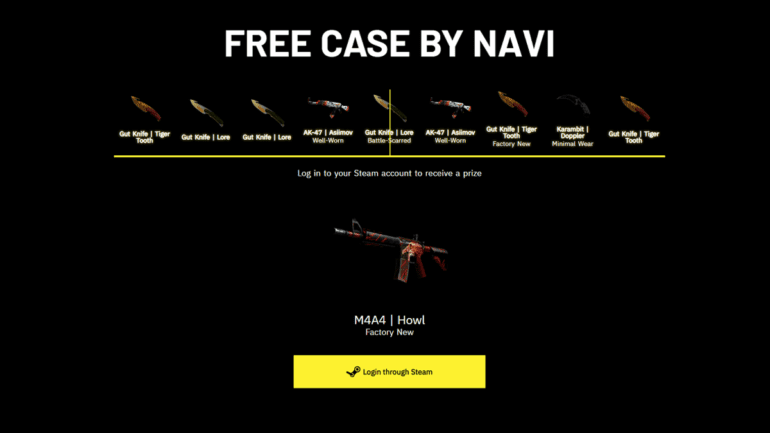
Usually, the scammers either comment on your Steam profile or send you a message with the URL to their bogus website or a YouTube video. As soon as users click on the link, they are directed onto a website that claims to provide a free in-game item, such as a “COVID-19 CS:GO case”.
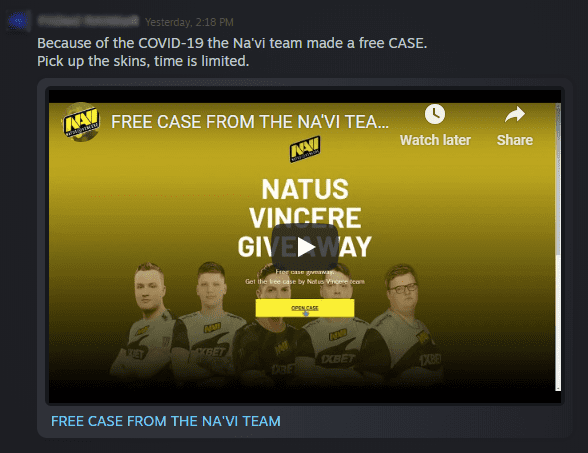
Steam Scam
CS:GO Giveaway Scam | Steam Chat

After unveiling the “prize”, the users are then prompted to log into their Steam accounts. Once you’ve entered all the credentials, the website will immediately change your account’s e-mail address and password, and remove any phone number associated with your account. Even if you have Steam Authenticator activated, it will be removed. If you have a recovery e-mail associated with your account, it will be changed.

At this point, you will be spammed with e-mails from Steam Support regarding your account’s details being changed. All of this happens in a matter of seconds, so you’ll have no time to react. Once your account is hijacked, your Steam profile will become private and you’ll be locked out of your account. The website will also send a message to everyone in your friends-list with the URL of the bogus website. If it’s from someone they know, it can be trusted, right?

Why Are Russians After Your Account?

If you become a victim to this scam, you will receive an e-mail from Steam Support informing you that your account was accessed from an unknown country, often Russia. Why do these scammers snip accounts? It’s simple, to sell them illegally! There are numerous accounts that cost thousands of dollars and this is free real-estate for them.
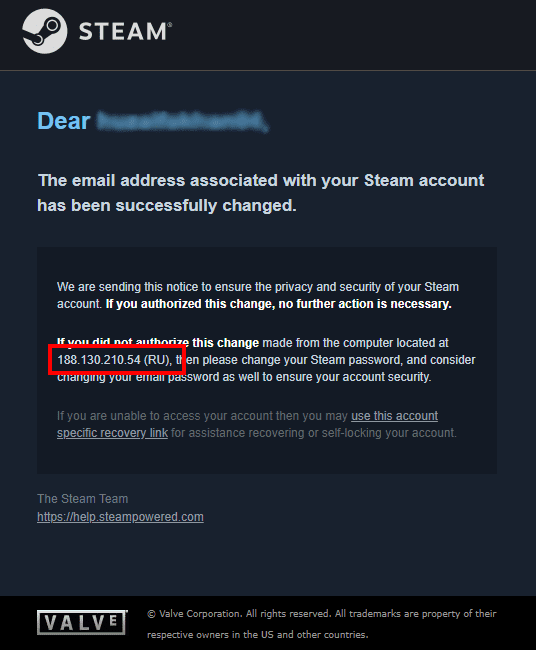
Steam Support

How To Retrieve Your Hijacked Steam Account?

If you’ve become a victim for this scam, don’t worry, you can still retrieve your account. You’re still the owner and you can recover your account by contacting Steam Support. If your account gets hijacked and stolen;

  • Immediately attempt to log into your account even it is futile to do so. At this point, the scammers will have changed the e-mail address and phone number associated with your account to their own.
  • Once you’re certain that you don’t have access to the e-mail associated to your account, without any wait, contact Steam Support.
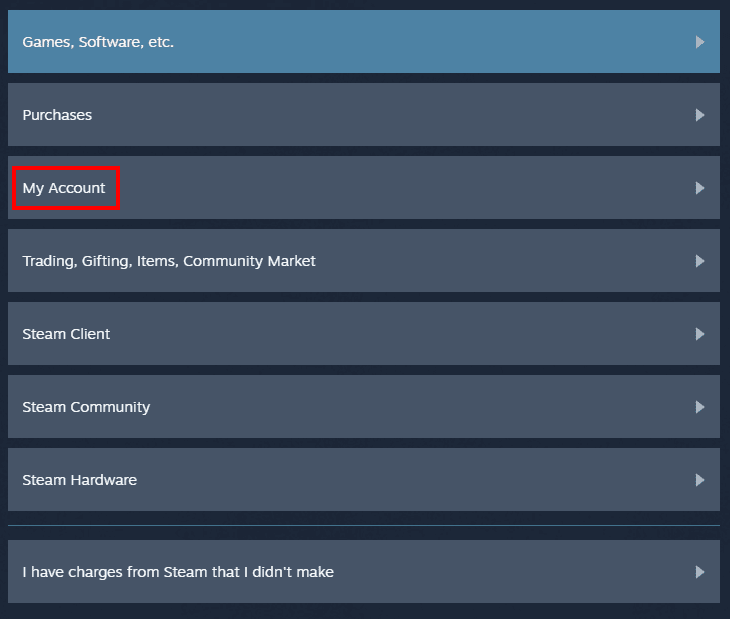
Steam Support
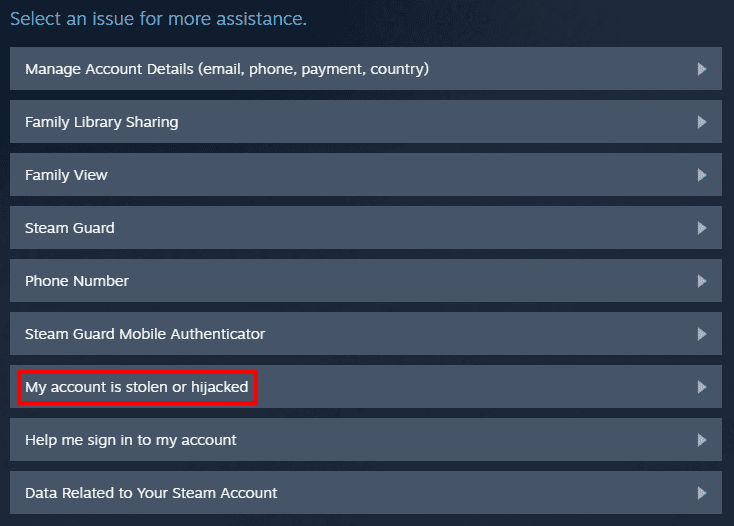
  • From the options, choose My Account, and then choose My account is stolen or hijacked.
512Steam Support
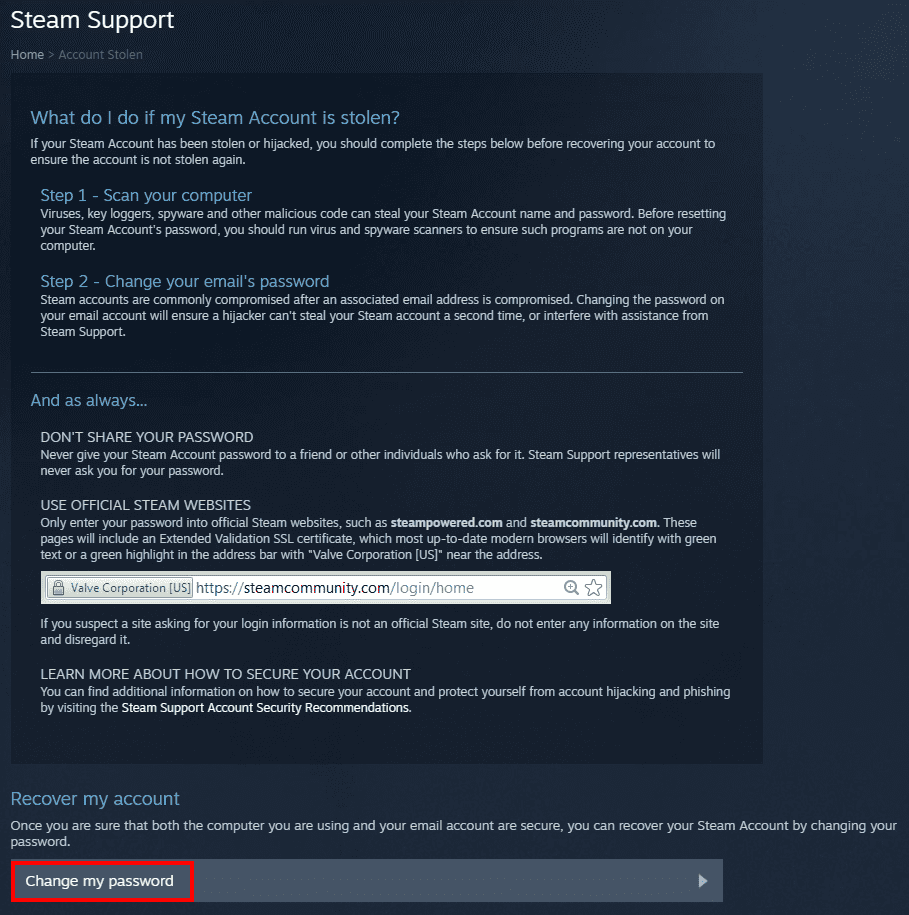
  • You will then be prompted with instructions on how to secure your account and other preventive measures. You can skip that and go to Change my password underneath Recover my account.
Steam
Steam Support
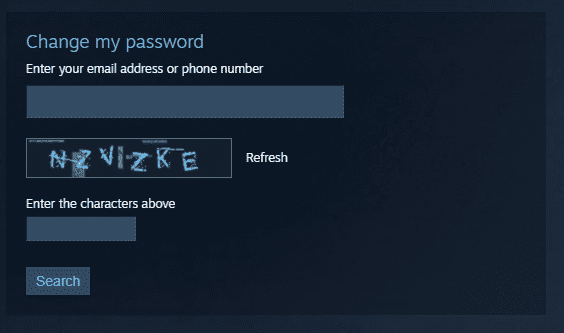
  • You will be asked you provide the e-mail address associated with your account. Here, you can enter the e-mail address formerly associated with your Steam account.
Steam
Steam Support
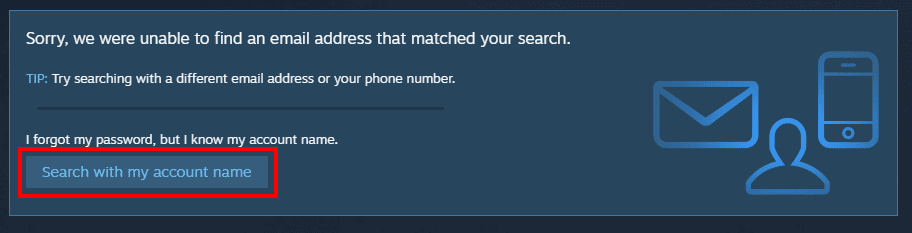
  • Since the scammers have removed your e-mail address from the account, you will receive a message on your screen, “Sorry, we were unable to find an email address that matched your search”. You can click on Search with account name beneath that.
Steam
Steam Support
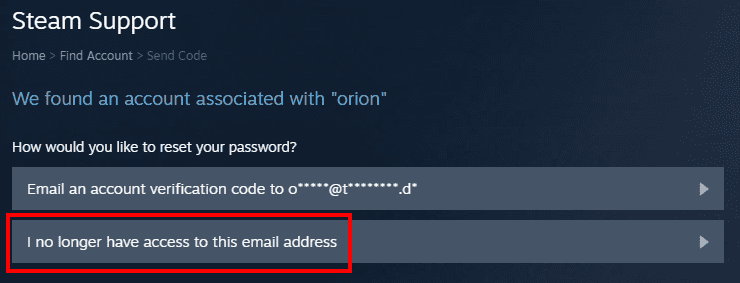
  • It seems counter-intuitive, but the scammers do not change your Steam profile name. You can enter your profile name (not your username), and you will be prompted with two option; to receive a verification code on your e-mail or I no longer have access to this e-mail address. Now, if you observe the e-mail address, you’ll notice that it isn’t yours and doesn’t have a common domain either. Obviously, you have to choose the second option!
Steam
Steam Support
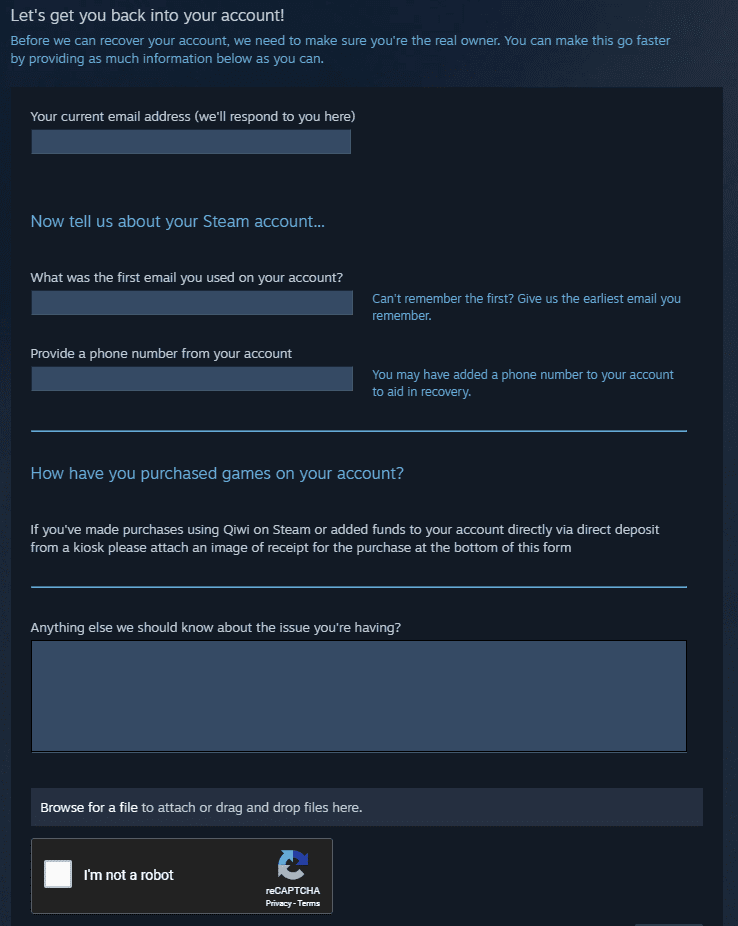
  • After that, you will be directed to fill a contact form with the required information. Remember, you have to state your issue in detail. You should also attach screenshots of any receipts (if any) from your Steam account, and screenshots of the e-mails you received immediately after your account was hijacked. All of this will prove your ownership of the account, so it is critical.
Steam
Steam Support
  • Now comes the worst part; you have to wait. It can take up to 3 days for Steam to respond, and they can ask for more information if needed. Hence, patience is required.

Often, phishing websites feature a poor design and grammatical mistakes, but these scams are becoming far more advanced. Hackers are going the extra mile to make their scams more convincing, and it’s working!

Tags
AccountDOTA 2 Giveaway ScamFree Case ScamFree Skin ScamGiveaway ScamHackedHijackedRussian ScamScamSolutionSteamStolen
Share
Related
Road 96

How to Fix Road 96 Launch Issues on PC (Steam)

Uzair Khalid·August 17, 2021
final fantasy pixel remaster

How to Fix the Ugly Font on Final Fantasy Pixel Remaster Games on PC

Uzair Khalid·July 30, 2021
Cover photo for scarlet nexus

Scarlet Nexus Save File location on Windows 10 (STEAM)

Arzaan Ul Mairaj·June 23, 2021

Follow on Social Media

Popular Articles

The Legend of Zelda: BotW on PC using CEMU

Download The Legend of Zelda: BotW on PC using Cemu 1.11.2 /1.11.3

disable Watch Dogs Legion BattlEye

How to disable Watch Dogs Legion BattlEye on PC (Ubisoft Connect/EGS)

Create a login Website – Creating unique identifier (Part 4) in Asp.net


  • About Us
  • Contact Us
  • Disclosure
  • Privacy Policy
Copyright 2021 TheNerdMag. All Rights Reserved
  • Tech
    • Apple
      • iOS
      • iPhone
      • iPad
      • iOS Jailbreak
    • Google
      • Android
      • Google Smartwatch
      • Google Glass
      • Google Hangouts
      • Google I/O 2014
      • Google Maps
    • Microsoft
      • Microsoft office
      • Microsoft Windows
      • Microsoft Surface
      • Microsoft SmartWatch
      • Windows Phone
    • Smartphones
    • Tablets
  • Apps
    • iOS Apps
    • Jailbreak Tweaks
    • Windows Metro Apps
    • Windows Phone Apps
  • Gaming
    • Android Games
    • Blackberry Games
    • iOS Games
    • Nintendo Games
    • PC Games
    • PlayStation Games
    • Wii U Games
    • Windows Games
    • Windows Phone Games
    • Xbox Games
  • Tutorials
  • Reviews
    • Laptops
    • Smartphones Review
    • Tablets Review
  • More
    • Entertainment
      • Movies
      • Music
      • TV Seasons
    • Lifestyle
      • Beauty
      • Fashion
Start typing to see results or hit ESC to close
Games PC Games PS4 Games Xbox One Games Steam Games
See all results